

Obtain the plugin
The v4.2 guide references WordPress plugin package 4.1.9. Request the current authorized package from the acquirer or Integrations team and confirm compatibility with the installed WordPress and WooCommerce versions.Download WordPress plugin
Download the latest official Alignet One plugin for WordPress and WooCommerce.
Install and activate
1
Open the administrator
Sign in to WordPress as an administrator and open Plugins → Add New.
2
Upload the package
Select Upload Plugin, choose the official ZIP file, and click Install Now.
3
Activate
Activate the plugin and verify that WordPress reports no compatibility or dependency errors.
Configure the payment method
Open WooCommerce → Settings → Payments → Alignet One Checkout and enter the values supplied by your acquirer or generated in VPayment.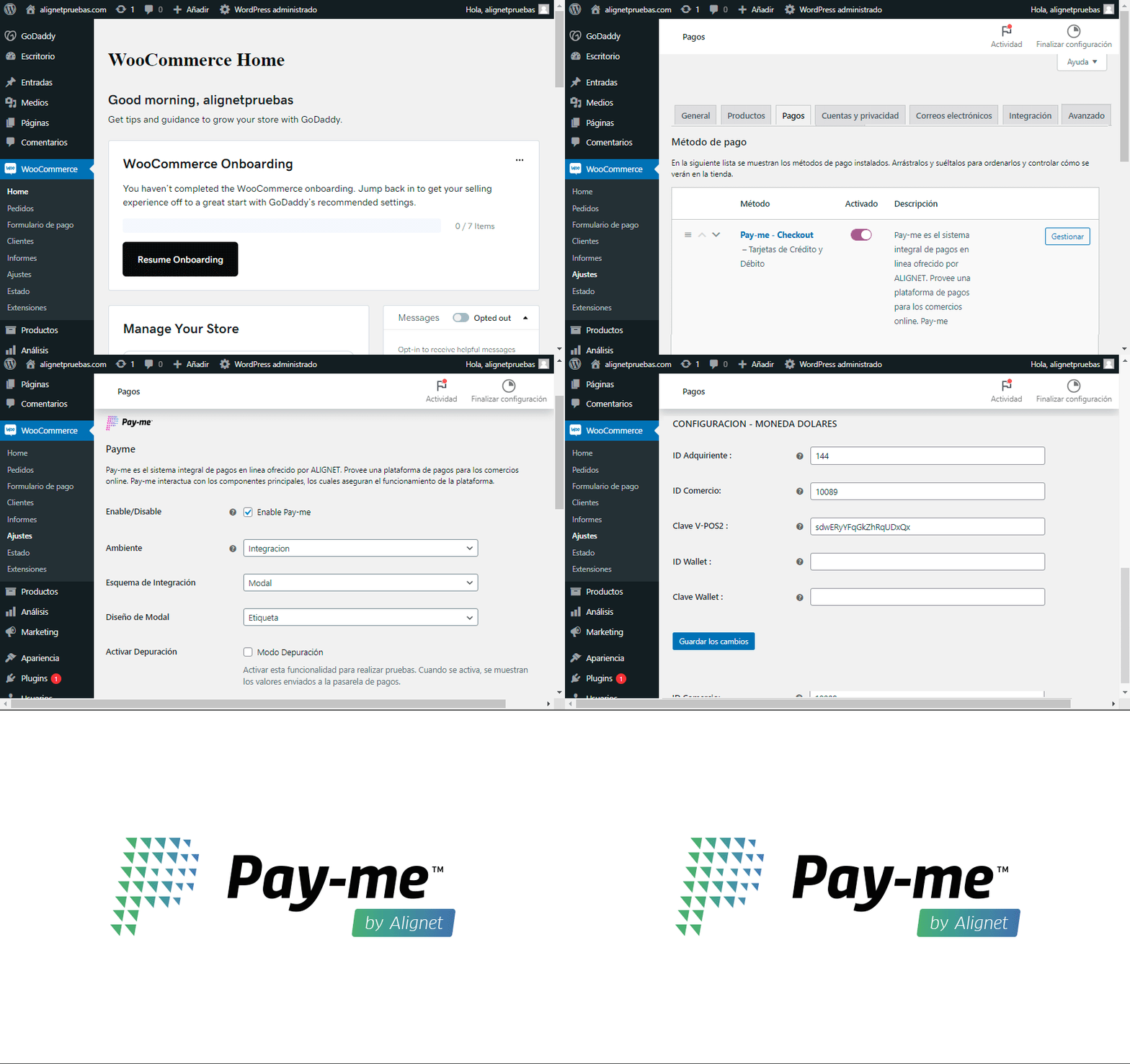
Opening and configuring the Alignet One Checkout payment method in WooCommerce.
Configure only enabled currencies and ensure the WooCommerce store currency matches the corresponding credential block.
Post-installation checks
- The payment method appears in checkout.
- Integration is the active environment.
- IDs contain no extra spaces or characters.
- Keys belong to the same merchant and environment.
- The response URL has been shared and registered.
- WordPress logs show no plugin errors.