> ## Documentation Index
> Fetch the complete documentation index at: https://docs.alignet.com/llms.txt
> Use this file to discover all available pages before exploring further.
# Requisitos e instalación iOS
> Agrega los XCFrameworks de Alignet SDK al proyecto iOS.
## Requisitos
* iOS 13.0 o superior.
* Xcode 13 o superior.
* Swift 5.5 o superior.
* Key del comercio entregada por Alignet.
* `Payme.xcframework`, `SecureKey3DS.xcframework`, `VisaSensoryBranding.xcframework` y `MastercardSonic.xcframework`.
[Descargar el paquete oficial iOS v2.2](https://docs.alignet.com/__attachments/188350468/SDK_Payme_iOS_v2.2.zip)
## Agregar los frameworks
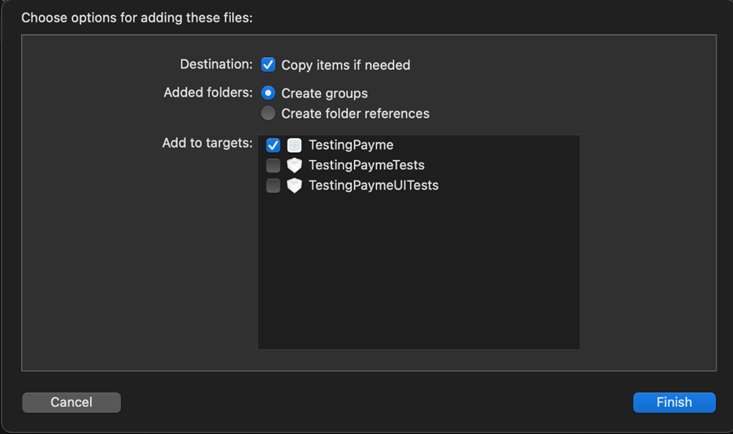
Arrastra las cuatro librerías al proyecto y selecciona **Copy items if needed** y **Create groups**.
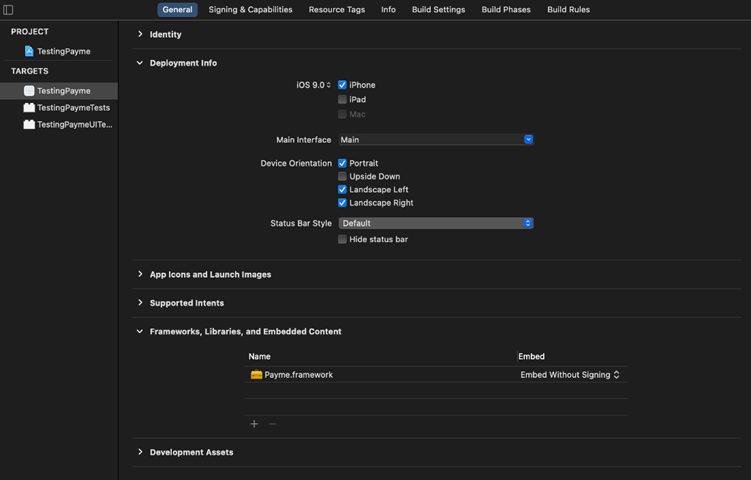
 En el target abre **Frameworks, Libraries, and Embedded Content** y configura los SDK como **Embed Without Signing**.
 Incluye también el SDK de autenticación proporcionado por Alignet.
* [ ] Los cuatro XCFrameworks están presentes.
* [ ] El target mínimo es iOS 13 o superior.
* [ ] La configuración de embed es correcta.
* [ ] El proyecto compila para dispositivo y simulador según el paquete entregado.
* [ ] La Key se obtiene desde una configuración segura.
[Continuar con inicialización →](/sdk/ios/inicializacion)
Incluye también el SDK de autenticación proporcionado por Alignet.
* [ ] Los cuatro XCFrameworks están presentes.
* [ ] El target mínimo es iOS 13 o superior.
* [ ] La configuración de embed es correcta.
* [ ] El proyecto compila para dispositivo y simulador según el paquete entregado.
* [ ] La Key se obtiene desde una configuración segura.
[Continuar con inicialización →](/sdk/ios/inicializacion)