> ## Documentation Index
> Fetch the complete documentation index at: https://docs.alignet.com/llms.txt
> Use this file to discover all available pages before exploring further.
# Orders and authentication
> Order statuses and VCI authentication results.
When VPayment Web receives an order, it validates the data, starts authentication and authorization, and stores the result for later review and operation.
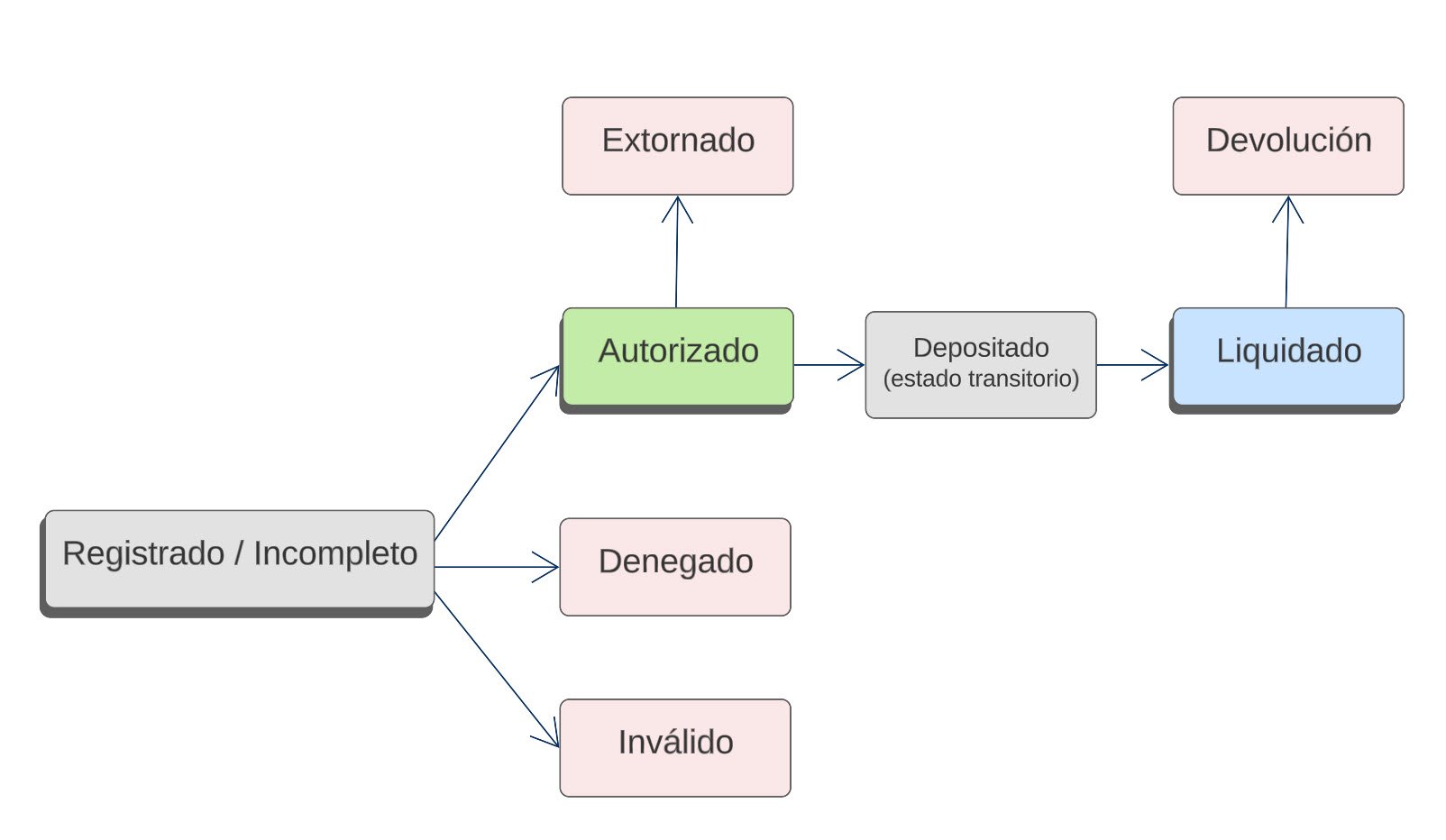 ## Order statuses
| Status | Meaning |
| --------------------------- | ------------------------------------------------------------------------------------ |
| **Registered / Incomplete** | Data is consistent and processing continues, or the buyer did not complete checkout. |
| **Invalid** | Data does not meet the format or a prevention rule stopped processing. |
| **Authorized** | The issuer approved the operation during Base I processing. |
| **Declined** | The issuer rejected the operation and returned a reason. |
| **Deposited** | Under manual settlement, the authorized order was placed in an open batch. |
| **Settled** | The batch was closed and prepared for Base II processing. |
| **Reversed** | An administrator reversed an authorized order. |
| **Refund** | The merchant initiated a partial or full return to the cardholder. |
Some acquirers may use additional statuses.
## Authentication VCI values
VCI values identify the scenario in which authentication ended.
| Stage | Result | VCI |
| ------------ | ------------------------------------------------ | ------ |
| Versioning | Merchant does not participate | `NPC` |
| Versioning | BIN does not participate | `NPB` |
| Versioning | Merchant and BIN do not participate | `NPCB` |
| Versioning | Merchant and BIN participate | `SPCB` |
| Frictionless | Successful authentication | `TSYS` |
| Frictionless | Attempt: card not enrolled or issuer unavailable | `TSAS` |
| Frictionless | Not authenticated or declined | `TSNS` |
| Frictionless | Authentication rejected | `TSRS` |
| Frictionless | Technical authentication failure | `TSUS` |
| Challenge | Authentication incomplete | `TSCF` |
| Challenge | Successful authentication | `TSYF` |
| Challenge | Not authenticated or declined | `TSNF` |
| Challenge | Authentication rejected | `TSRF` |
| Challenge | Technical authentication failure | `TSUF` |
Results `TSYS`, `TSAS`, and `TSYF` may continue to authorization. The final rule depends on the contracted service.
## Order statuses
| Status | Meaning |
| --------------------------- | ------------------------------------------------------------------------------------ |
| **Registered / Incomplete** | Data is consistent and processing continues, or the buyer did not complete checkout. |
| **Invalid** | Data does not meet the format or a prevention rule stopped processing. |
| **Authorized** | The issuer approved the operation during Base I processing. |
| **Declined** | The issuer rejected the operation and returned a reason. |
| **Deposited** | Under manual settlement, the authorized order was placed in an open batch. |
| **Settled** | The batch was closed and prepared for Base II processing. |
| **Reversed** | An administrator reversed an authorized order. |
| **Refund** | The merchant initiated a partial or full return to the cardholder. |
Some acquirers may use additional statuses.
## Authentication VCI values
VCI values identify the scenario in which authentication ended.
| Stage | Result | VCI |
| ------------ | ------------------------------------------------ | ------ |
| Versioning | Merchant does not participate | `NPC` |
| Versioning | BIN does not participate | `NPB` |
| Versioning | Merchant and BIN do not participate | `NPCB` |
| Versioning | Merchant and BIN participate | `SPCB` |
| Frictionless | Successful authentication | `TSYS` |
| Frictionless | Attempt: card not enrolled or issuer unavailable | `TSAS` |
| Frictionless | Not authenticated or declined | `TSNS` |
| Frictionless | Authentication rejected | `TSRS` |
| Frictionless | Technical authentication failure | `TSUS` |
| Challenge | Authentication incomplete | `TSCF` |
| Challenge | Successful authentication | `TSYF` |
| Challenge | Not authenticated or declined | `TSNF` |
| Challenge | Authentication rejected | `TSRF` |
| Challenge | Technical authentication failure | `TSUF` |
Results `TSYS`, `TSAS`, and `TSYF` may continue to authorization. The final rule depends on the contracted service.