> ## Documentation Index
> Fetch the complete documentation index at: https://docs.alignet.com/llms.txt
> Use this file to discover all available pages before exploring further.
# Latest improvements
> Recent improvements in viewing and user experience at Alignet One Flex.
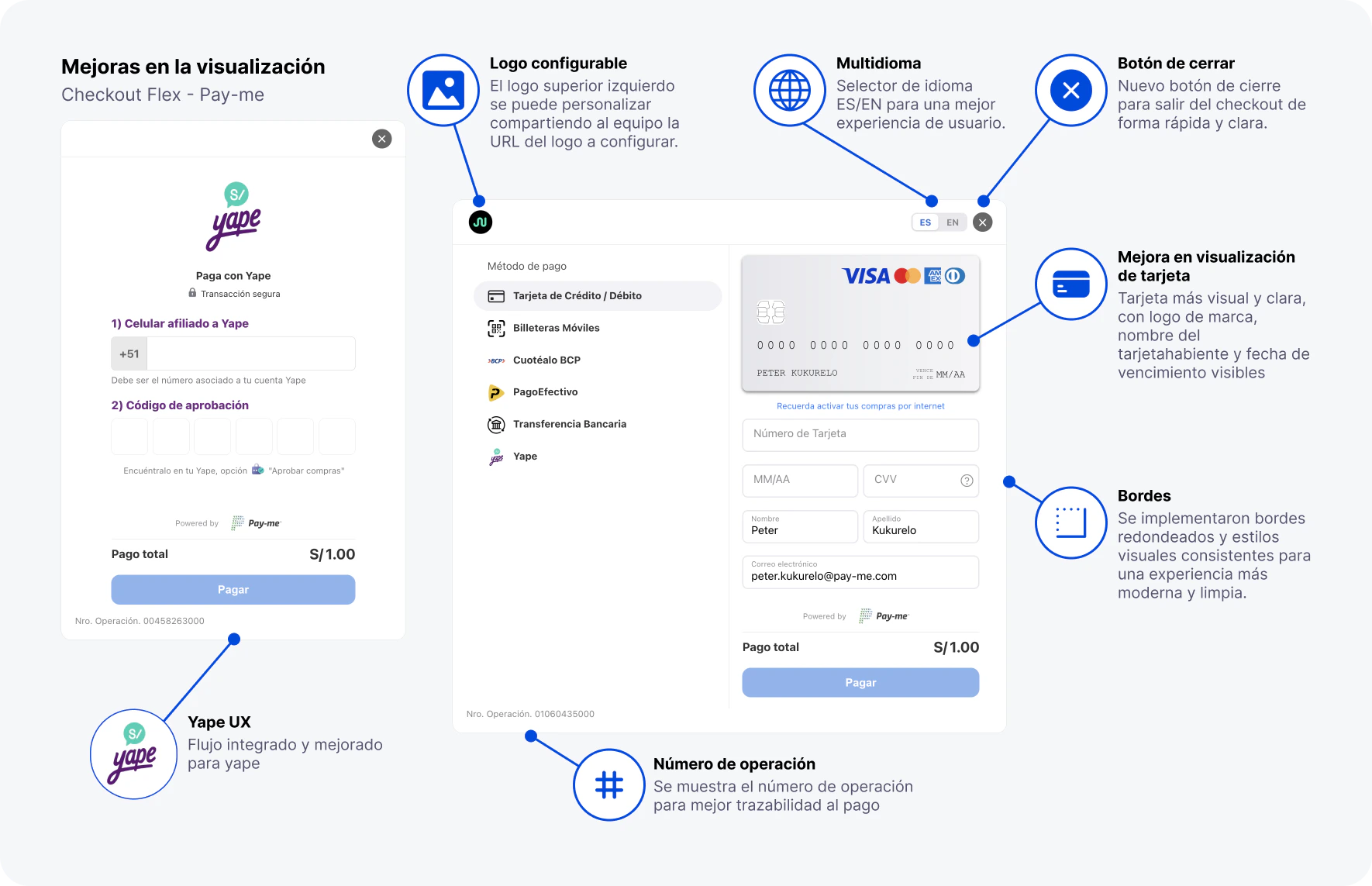
Alignet One Flex incorporates visual and experience improvements to make the checkout more clear, modern and user-friendly for the buyer.
These improvements apply to the visual experience of the component Flex. The final availability may depend on the library version used and the matching set.
 ## Where they are set up
These improvements are seen according to the component version and the configuration sent by initializing Flex. If your merchant already has Flex Please check this table to figure out what to add or validate to your integration.
| Enhancement | What have you got to check? | Parameter or guide |
| :---------------- | :--------------------------------------------------------------------------------------------------------------- | :--------------------------------------------------------------------------------------------------------------------------------------------------------------------------------------- |
| Configure logo | The merchant should share URL public logo that you wish to display at the top left of the check out. | Configure enabled by integration equipment |
| Multidioma | Add the language settings if you want to display the selector `ES` / `EN`. | [`i18n.mode`, `i18n.default_language`, `i18n.languages`](/en/virtual-payments/checkout-web/flex/component-initialization) |
| Closing Button | Turn on the button if you need the buyer to get out of the checkout from the interface. | [`settings.show_close_button`](/en/virtual-payments/checkout-web/flex/component-initialization) |
| Most visual card | Valves that the method `CARD` have been authorized and have the payload send the required buyer information. | [`display_settings.methods`](/en/virtual-payments/checkout-web/flex/component-initialization) and [Construction of payload](/en/virtual-payments/checkout-web/flex/payload-construction) |
| Bordes and styles | Define if the container is shown with visual edge or if your external Layout already handles it. | [`settings.show_border`](/en/virtual-payments/checkout-web/flex/component-initialization) |
| Yape UX | Realizes that `YAPE` be available for the merchant and, if you have limited methods, put it in the visible list. | [`display_settings.methods`](/en/virtual-payments/checkout-web/flex/component-initialization) and [Test data](/en/virtual-payments/payments/test-data) |
| Operating number | It activates the display of the operation number if you need traceability for support. | [`settings.show_operation_number`](/en/virtual-payments/checkout-web/flex/component-initialization) |
If you don't send `display_settings.methods`, Flex will display the methods enabled for your default merchant. If you do send the list, you have to explicitly include the methods you want to display, for example `CARD` or `YAPE`.
The configurable logo isn't sent into the initialization object. To enable it, the merchant should share with the integration team an URL public HTTPS from the logo that will be shown in the checkout.
## Upgrading of viewing
Personalization of the upper left checkout logo. The merchant should send the URL from logo to integration equipment to configure.
Language selector `ES` / `EN` To offer a more clear experience with the user's language.
New visible clasp to leave the check out quickly, clear and controlled.
Upgrading card visualisation with brand logos, name and date of expiry.
Rounding bordes and consisstore visual styles for a more modern and clean experience.
Integrated and improved flow for payments with Yapewith more clear user fields and messages.
Visualization of operation number to improve traceability and support during payment.
## Detail for improvement
* It allows you to customize the logo that appears at the top left of the checkout.
* The merchant should share URL public HTTPS from the logo you wish to display.
* The URL have to aim directly at the image file and be available without authentication.
* The activation is co-ordinated with the integration equipment and cannot be configured from `settings`, `display_settings` and `i18n`.
* Visible language select inside the checkout.
* initial support for `ES` and `EN`.
* Help merchantrs with buyers who prefer a bilingual experience.
* It's set up with [Initiate component](/en/virtual-payments/checkout-web/flex/component-initialization), within the object `i18n`.
* Most visible closing button at interface.
* It allows us to leave the checkout without ambiguity.
* It improves user monitoring during the payment process.
* It's activated with `settings.show_close_button` in [Initiate component](/en/virtual-payments/checkout-web/flex/component-initialization).
* A more visual renderized card.
* Visible brand Logos as appropriate.
* Main fields organized to facilitate reading.
* Check. `CARD` in `display_settings.methods` and information sent at [Construction of payload](/en/virtual-payments/checkout-web/flex/payload-construction).
* Rounding bordes in containers and fields.
* Cleaner visual separation between payment methods and form.
* Cleaner and more consisstore appearance between flows.
* It's controlled with `settings.show_border` in [Initiate component](/en/virtual-payments/checkout-web/flex/component-initialization).
* Display of Yape more direct.
* Cell field and better differentiated approval code.
* Help messages aimed at reducing buyer errors.
* Check that `YAPE` and `display_settings.methods` and uses [Test data](/en/virtual-payments/payments/test-data) To validate the flow.
* Checkout shows the operation number associated with payment.
* Facilitates traceability for support, reconciliation and operational review.
* Help the merchant and the buyer to identify an attempt to pay.
* It's activated with `settings.show_operation_number` in [Initiate component](/en/virtual-payments/checkout-web/flex/component-initialization).
## Recommendation
If you have an integration Flex Reg these improvements to production before enabling them to production. Specially valid logo configurable, language, checkout closure, Yape and display card in browsers supported by your merchant.
## Related guides
Figure `settings`, `display_settings.methods` e `i18n` to activate or restrict these improvements.
Check the operation and buyer data that Flex used to render the flow correctly.
Processes responses, events and errors during payment flow.
Valid card, Yape and other methods at production before enabling production.
## Where they are set up
These improvements are seen according to the component version and the configuration sent by initializing Flex. If your merchant already has Flex Please check this table to figure out what to add or validate to your integration.
| Enhancement | What have you got to check? | Parameter or guide |
| :---------------- | :--------------------------------------------------------------------------------------------------------------- | :--------------------------------------------------------------------------------------------------------------------------------------------------------------------------------------- |
| Configure logo | The merchant should share URL public logo that you wish to display at the top left of the check out. | Configure enabled by integration equipment |
| Multidioma | Add the language settings if you want to display the selector `ES` / `EN`. | [`i18n.mode`, `i18n.default_language`, `i18n.languages`](/en/virtual-payments/checkout-web/flex/component-initialization) |
| Closing Button | Turn on the button if you need the buyer to get out of the checkout from the interface. | [`settings.show_close_button`](/en/virtual-payments/checkout-web/flex/component-initialization) |
| Most visual card | Valves that the method `CARD` have been authorized and have the payload send the required buyer information. | [`display_settings.methods`](/en/virtual-payments/checkout-web/flex/component-initialization) and [Construction of payload](/en/virtual-payments/checkout-web/flex/payload-construction) |
| Bordes and styles | Define if the container is shown with visual edge or if your external Layout already handles it. | [`settings.show_border`](/en/virtual-payments/checkout-web/flex/component-initialization) |
| Yape UX | Realizes that `YAPE` be available for the merchant and, if you have limited methods, put it in the visible list. | [`display_settings.methods`](/en/virtual-payments/checkout-web/flex/component-initialization) and [Test data](/en/virtual-payments/payments/test-data) |
| Operating number | It activates the display of the operation number if you need traceability for support. | [`settings.show_operation_number`](/en/virtual-payments/checkout-web/flex/component-initialization) |
If you don't send `display_settings.methods`, Flex will display the methods enabled for your default merchant. If you do send the list, you have to explicitly include the methods you want to display, for example `CARD` or `YAPE`.
The configurable logo isn't sent into the initialization object. To enable it, the merchant should share with the integration team an URL public HTTPS from the logo that will be shown in the checkout.
## Upgrading of viewing
Personalization of the upper left checkout logo. The merchant should send the URL from logo to integration equipment to configure.
Language selector `ES` / `EN` To offer a more clear experience with the user's language.
New visible clasp to leave the check out quickly, clear and controlled.
Upgrading card visualisation with brand logos, name and date of expiry.
Rounding bordes and consisstore visual styles for a more modern and clean experience.
Integrated and improved flow for payments with Yapewith more clear user fields and messages.
Visualization of operation number to improve traceability and support during payment.
## Detail for improvement
* It allows you to customize the logo that appears at the top left of the checkout.
* The merchant should share URL public HTTPS from the logo you wish to display.
* The URL have to aim directly at the image file and be available without authentication.
* The activation is co-ordinated with the integration equipment and cannot be configured from `settings`, `display_settings` and `i18n`.
* Visible language select inside the checkout.
* initial support for `ES` and `EN`.
* Help merchantrs with buyers who prefer a bilingual experience.
* It's set up with [Initiate component](/en/virtual-payments/checkout-web/flex/component-initialization), within the object `i18n`.
* Most visible closing button at interface.
* It allows us to leave the checkout without ambiguity.
* It improves user monitoring during the payment process.
* It's activated with `settings.show_close_button` in [Initiate component](/en/virtual-payments/checkout-web/flex/component-initialization).
* A more visual renderized card.
* Visible brand Logos as appropriate.
* Main fields organized to facilitate reading.
* Check. `CARD` in `display_settings.methods` and information sent at [Construction of payload](/en/virtual-payments/checkout-web/flex/payload-construction).
* Rounding bordes in containers and fields.
* Cleaner visual separation between payment methods and form.
* Cleaner and more consisstore appearance between flows.
* It's controlled with `settings.show_border` in [Initiate component](/en/virtual-payments/checkout-web/flex/component-initialization).
* Display of Yape more direct.
* Cell field and better differentiated approval code.
* Help messages aimed at reducing buyer errors.
* Check that `YAPE` and `display_settings.methods` and uses [Test data](/en/virtual-payments/payments/test-data) To validate the flow.
* Checkout shows the operation number associated with payment.
* Facilitates traceability for support, reconciliation and operational review.
* Help the merchant and the buyer to identify an attempt to pay.
* It's activated with `settings.show_operation_number` in [Initiate component](/en/virtual-payments/checkout-web/flex/component-initialization).
## Recommendation
If you have an integration Flex Reg these improvements to production before enabling them to production. Specially valid logo configurable, language, checkout closure, Yape and display card in browsers supported by your merchant.
## Related guides
Figure `settings`, `display_settings.methods` e `i18n` to activate or restrict these improvements.
Check the operation and buyer data that Flex used to render the flow correctly.
Processes responses, events and errors during payment flow.
Valid card, Yape and other methods at production before enabling production.