> ## Documentation Index
> Fetch the complete documentation index at: https://docs.alignet.com/llms.txt
> Use this file to discover all available pages before exploring further.
# iOS requirements and installation
> Add the Alignet SDK XCFrameworks to an iOS project.
## Requirements
* iOS 13.0 or later.
* Xcode 13 or later.
* Swift 5.5 or later.
* Merchant Key provided by Alignet.
* `Payme.xcframework`, `SecureKey3DS.xcframework`, `VisaSensoryBranding.xcframework`, and `MastercardSonic.xcframework`.
[Download the official iOS v2.2 package](https://docs.alignet.com/__attachments/188350468/SDK_Payme_iOS_v2.2.zip)
## Add the frameworks
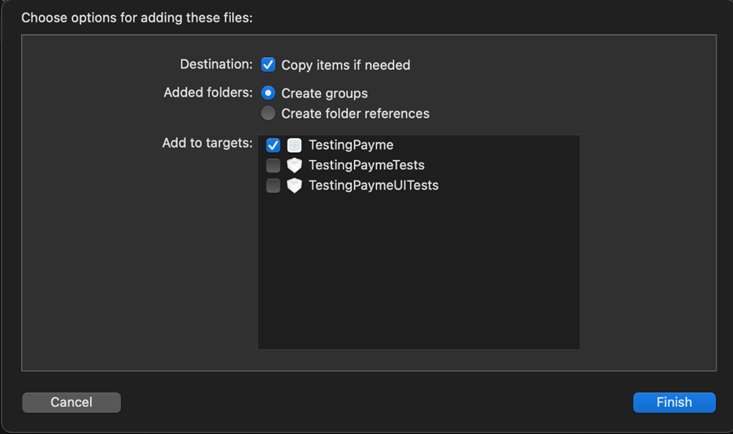
Drag the four libraries into the project and select **Copy items if needed** and **Create groups**.
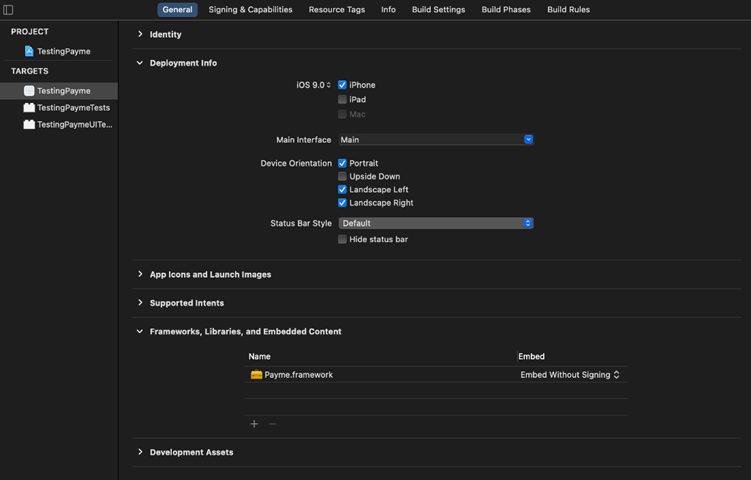
 In the target, open **Frameworks, Libraries, and Embedded Content** and configure the SDKs as **Embed Without Signing**.
 Also include the authentication SDK provided by Alignet.
* [ ] All four XCFrameworks are present.
* [ ] The minimum target is iOS 13 or later.
* [ ] The embed setting is correct.
* [ ] The project builds for device and simulator as supported by the delivered package.
* [ ] The Key is loaded from secure configuration.
[Continue to initialization →](/en/sdk/ios/initialization)
Also include the authentication SDK provided by Alignet.
* [ ] All four XCFrameworks are present.
* [ ] The minimum target is iOS 13 or later.
* [ ] The embed setting is correct.
* [ ] The project builds for device and simulator as supported by the delivered package.
* [ ] The Key is loaded from secure configuration.
[Continue to initialization →](/en/sdk/ios/initialization)